

This post is based on a paid media strategy we used to scale a client 199.77% while decreasing their Cost Per Lead by 51.88% — at the same time their customers were "fleeing" their market — all in 4 months.
My client was in a rather unique situation. They are in the real estate business and wanted to scale their account to make up for lost business they had experienced in 2021. The problem was, they were in a very unique location, and their market population actually shrank by 6.9% in 2021.
Faced with this situation, we were able to scale their ads account by 199.77% and actually reduce their Cost Per Lead by 51.88% in four months time.
And this wasn't a one-time fluke — we have continued to grow their account year over year by 70.3% while still reducing their Cost per Lead by 53.83%.
The Mountain Climber Strategy: Scaling Lead Generation On Google Ads
Keyword research, account structure — they are all important factors to focus on when setting up your Google Ads account. But that is just the basics. Nothing beats a system for scaling your lead generation while cutting your cost per lead at the same time. Month after month, year after year.
Here is what that looks like in real life:
Ask anyone who has ever run paid media, particularly in Google Ads, on what is important to run an account and they will tell you this:
- Extensively do "keyword research" and find the "right" keywords to advertise your product or service.
- Set up split tests for your ads and painstakingly wait for results.
- If you want to grow and scale your account, wash, rinse and repeat for new keywords and better ads, hoping that it will work.
Quite frankly that's an old strategy that worked well before 2018, but doesn't utilize the entire arsenal and spectrum of features that Google Ads has to offer now.
There have been so many advances with Google, you can follow those steps and never, ever see results because you are relying on brute force and manual labor. If you want to scale your lead generation, you need to lean into the tech advances of a $250+ Billion company.
Humans + Machines > Machines
— Frederick Vallaeys, "Unlevel The Playing Field", pg 15
Humans provide the strategy and direction. Machines (or in this case, Google's Artificial Intelligence) provide the automations to manage minute details and analyze data at scale.
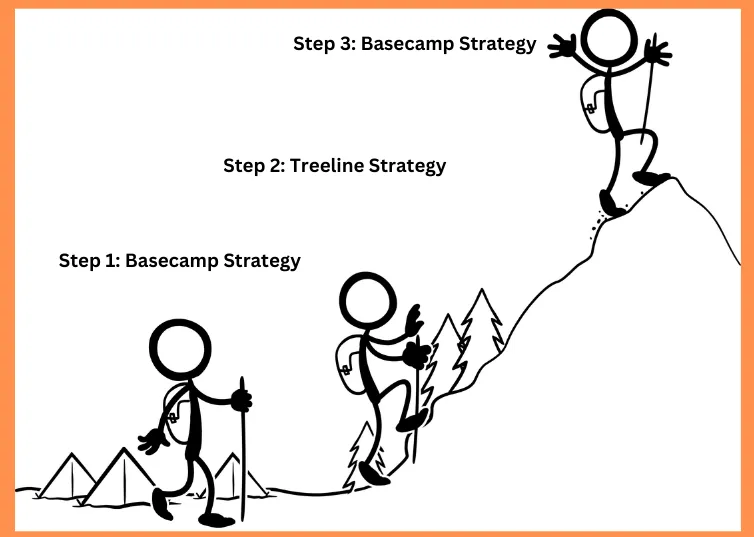
The 3 Steps of the Mountain Climber Strategy
Step 1: Basecamp — Set Measurement Strategy For Future Growth
Step 2: Treeline — Set Ads Strategy For Pinpoint Relevancy
Step 3: Get To The Peak — Scale Strategy To Grow Your Leads
Have you ever gone hiking or done any mountain climbing? (We are based in Colorado, USA — mountain climbing is what we do here.) You'll relate to the process of getting all of the proper gear together before you head out, hiking through the first and longest part until you get to the "treeline" or when the trees stop growing. Finally, to the quick and rewarding ascent to the peak of the mountain where you get the spectacular views.
You don't just jump out and start hiking without a map plus all of the required gear, right? You need to plan for all weather conditions, pack water, proper gear, etc — or you aren't ever going to reach the summit.
In the context of a paid media strategy with Google Ads, you are the human setting the strategy and framework for how to guide the machine AI towards success. AI needs strategy and guidance, telling it what you want to have happen.
Step 1: Basecamp — Set Measurement Strategy For Future Growth
Your measurement strategy is precisely "what", "what's it worth" and "how" you are going to measure leads for your website. There are four levels of measurement in Google Ads:
1. What to Measure
What you are going to "count" as a conversion inside your account. For lead generation, there are generally two types of measurements: form fills (and then in turn sales) and phone calls. If you are a "local" business, you'll most likely rely on phone calls mostly, or a combination of the two. If you are strictly an internet-based business, it will be mostly form fills or sales.
2. Assign Values to Lead Types
Are you going to give different values to your conversions and bid on them differently? All leads aren't necessarily created equal. For example, different form fills may be more valuable than others, or phone calls may be more valuable to you.
Let me use an example from the client mentioned above — people literally "Booking A Tour" of their facility was the most valuable type of lead:
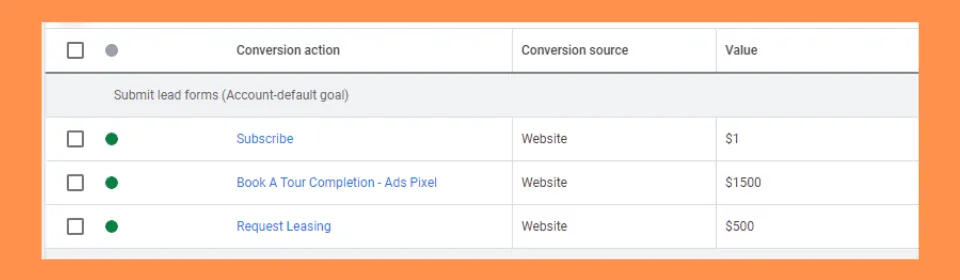
Talking to the client, they roughly convert 50% of those people to clients once they are physically on-site after having the tour booked. Knowing that they value a new client at roughly $3000 and some basic math gets you the $1500 value.
Don't worry if you don't know exactly what each type of lead is worth — what matters most is giving a relative value for each type of lead.
Why does this matter? If you assign values to each of the lead types, you can use bid strategies to get more of the most valuable leads. You're literally feeding the "bidding machine" info on which actions are more valuable.
3. Attribution Strategy
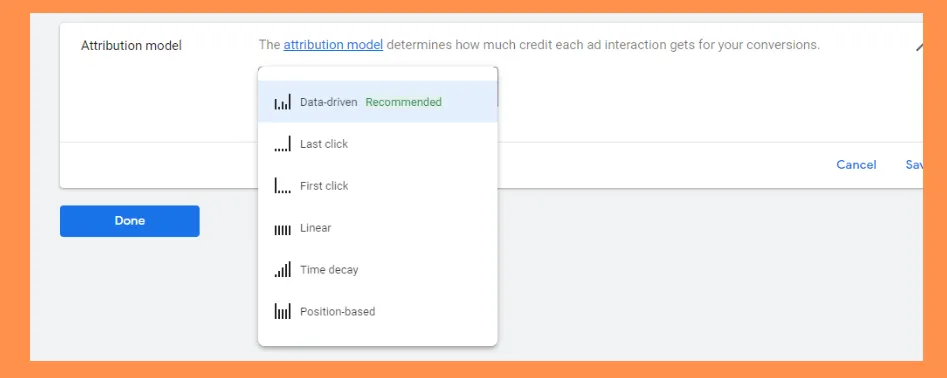
This is a bit more advanced, but essential. At its most basic level, attribution tells you whether you are going to count all of the clicks that lead to a conversion, only the first one, or only the last one.
For this client, it takes an average of 1.9 interactions (clicks) for someone to convert to a lead:
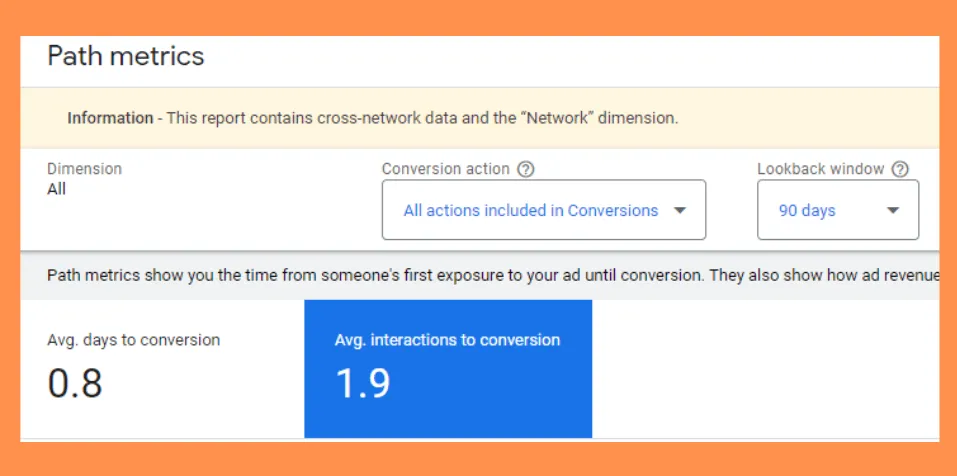
Despite what most people think, it usually takes more than 1 interaction with your website for a lead to convert. We recommend setting the attribution model to "data-driven".
4. AI-Driven Bidding Strategy
The final part of Step 1 is to tell the Google AI bidding algorithm how it's going to bid on different ads shown to your market against your competitors.
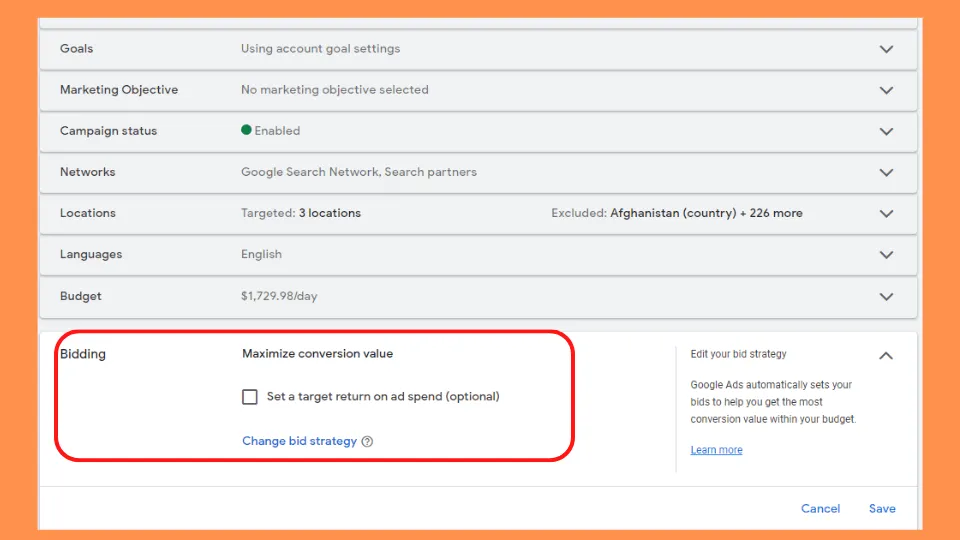
For lead generation, there are really two strategies to choose from: Maximize Conversion Value will bid to create the most "value" for any given campaign budget. tROAS tells the bidding machine that you want a certain amount of revenue to come from your spend.
For this client, we went with Maximize Conversion Value to generate the maximum number of leads for their budget:
Step 2: Treeline — Set Ads Strategy
The ascent to the treeline stage is about setting your ads and creative up for maximum growth potential and the final stage before you begin to scale your account.
We must position your ads to maximize use of Google's own ad intelligence and help the system put the right ad in front of the right customer. Here's how:
- Create Responsive Search Ads in each ad group
- Edit your RSAs to attain at least a "Good" ad strength
- Wash, rinse and repeat for each ad group
Writing Responsive Search Ads
Start with at least 6 headlines (of a possible 15). The "type" of headline should be:
- 2 "Keyword Focused" headlines
- 2 "Call To Action" headlines
- 2 unique "Feature / Benefit" headlines
For descriptions, start with all 4 possible description lines, focusing on the unique benefits and features of the keywords in each ad group.
Improving Ad Strength
Google Ads has a hidden feature where they will literally tell you what specific items need to be improved and give you examples:

If you click on "View Ideas," a menu of specific recommendations will appear:

Wash, rinse and repeat for each ad group in your account.
Step 3: Get To The Peak — Scale Strategy
This is where you start to scale your advertising and grow the number of leads. It's the final step, but uber important to complete the first two steps first — those lay the foundation for successful scaling.
- Utilize Google's AI targeting with Dynamic Search Ads
- Flip the switch on Broad Match Keywords
- Increase your budget incrementally to scale
Dynamic Search Ads
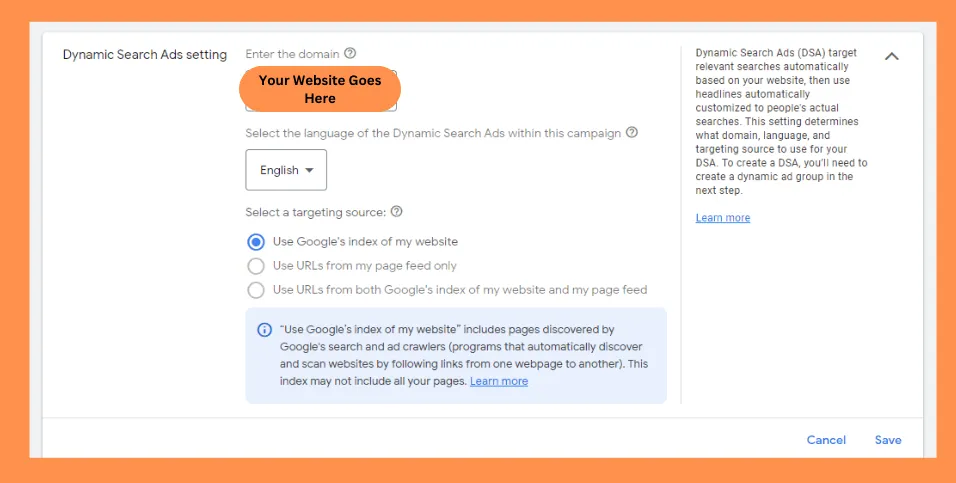
First, leverage Google's pre-built AI and targeting technology. You do this in two steps:
- Tell Google what pages on your site you'd like them to utilize
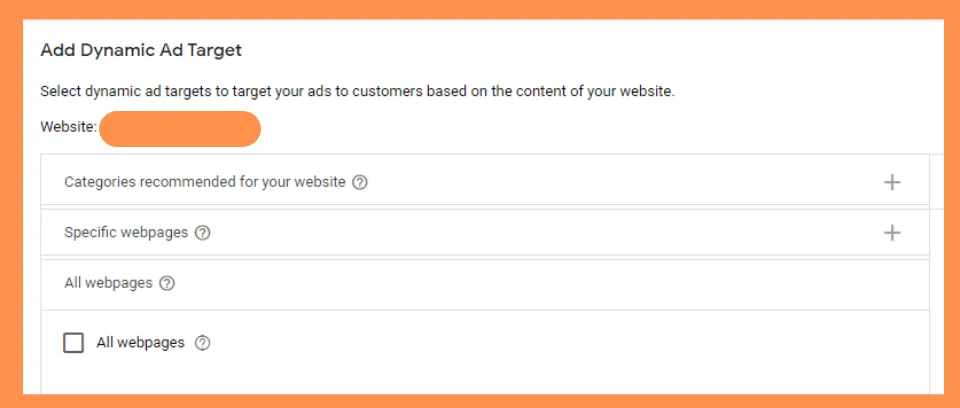
- Create a Dynamic Ad Target to specify targeting
For the second step, create a "Dynamic Ad Target." For starters, use the "All Webpages" setting:
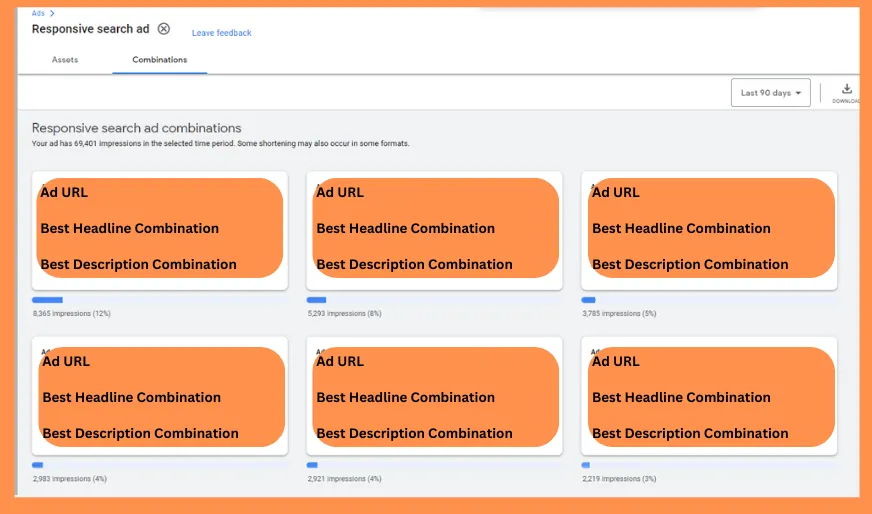
For the ad copy, revisit your best performing RSA from Step 2. Under any Responsive Search Ad, click "View Asset Details" → "Combinations" to see Google's best-performing ad combination:
Why Does This Work So Well?
- You're utilizing the AI of a $250 billion company to determine what your site content is relevant for
- The targeting AI goes beyond your keyword list automatically
- Combined with Steps 1 and 2, the signals compound
- For large sites, it fills the gaps of your standard keyword campaign
- Headlines and landing pages are generated dynamically, saving manual work
- If you have organic traffic, it's like putting ads behind your best organic searches
Broad Match Keywords
Now, flip a switch to utilize Google's full arsenal of signals and maximize reach. From Google Ads itself:
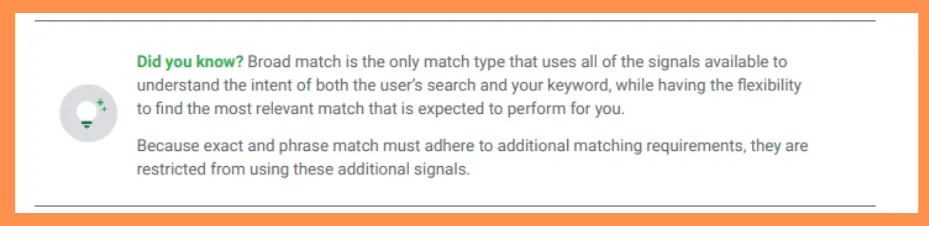
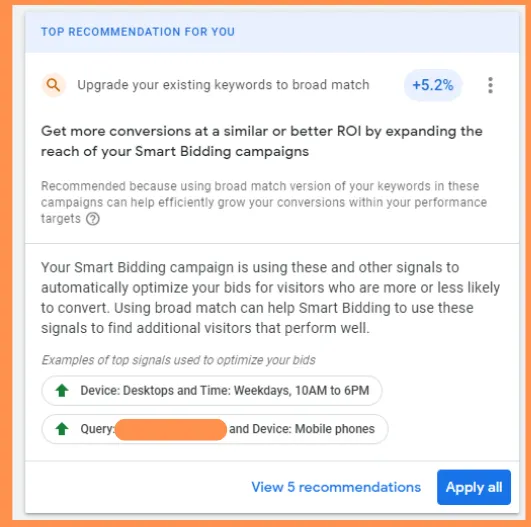
There are two ways to add broad match keywords:
- Determine your top 5-10 keywords already in your account
- Leverage Google's own suggestions from the Recommendations section
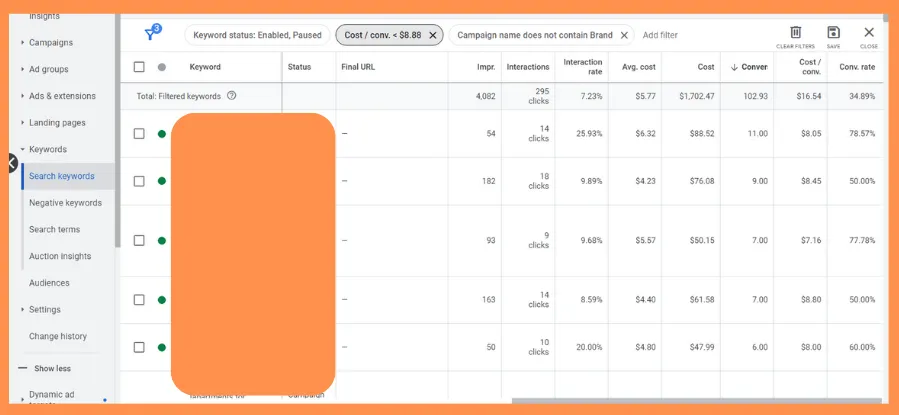
For picking your own broad match keywords: determine your average cost/conversion over at least 30 days, filter for keywords that cost less than that average, exclude brand keywords, then sort by most conversions:
Scale Incrementally
Finally, raise your campaign budgets by 10% per week. That gives your account enough time to "learn." Do this every 30 days until you've reached your desired volume of leads or your cost per lead starts to approach your maximum.
Common Questions
- Why can't I just start with Step 3 (scaling)?
- Without the measurement foundation (Step 1) and ad optimization (Step 2), Google's AI doesn't have the signals it needs to scale effectively. You'd be scaling blind.
- What if I have very little content on my site?
- Dynamic Search Ads work best with content-rich sites, but even a few well-built landing pages can provide enough signal for Google's targeting AI to find relevant searches.
- How long does it take to see results?
- With this client, we saw significant results within 4 months. Steps 1 and 2 can be completed in 2-4 weeks, with Step 3 showing compounding results over the following months.
Ready to Scale Your Lead Generation?
If you're looking to grow your leads and cut your cost per lead, the Mountain Climber Strategy is the system to do it with.
Let's Talk